Software for digital invoices in SAP Cloud
- Process incoming invoices without additional SAP user licenses
- Central cockpit for posting, pre-entry, and error handling in SAP
- Processing of e-invoices
Incoming invoices software edoc invoice
edoc invoice is a software solution for companies that want to manage incoming invoices digitally and in the cloud in combination with SAP Cloud ERP—without requiring additional SAP user licenses for invoice processing. Whether deployed on-premises, in the cloud, or in a hybrid setup, it integrates seamlessly with any ECM system.
The software covers the entire incoming invoice workflow outside of SAP. Invoices are captured, validated, and approved directly in edoc invoice. Once the process is complete, the relevant data is transferred to SAP securely and in a standardized format.
The SAP system itself remains unchanged (“clean core”) and can continue to be updated without restrictions. No deep technical integration or custom SAP development is required. If desired, edoc invoice can also be displayed directly within the SAP user interface.
What edoc invoice brings to your daily invoice processing:
- Centralized processing of all incoming invoices
- Support and processing of e-invoices (XRechnung, ZUGFeRD, etc.)
- Clear and structured review and approval workflows
- Controlled transfer of invoice data to SAP Cloud ERP
- Audit-ready and compliant with legal requirements
- Optimized for SAP Cloud ERP
Arrange a no-obligation presentation and give us 15 minutes of your time to inspire you!
Why process your invoices with edoc invoice?
With edoc invoice, companies using SAP Cloud ERP benefit from a clear separation between the ERP core system and invoice processing—both organizationally and technically.

Centralized, external processing of all incoming invoices
Support and processing of e-invoices (XRechnung, ZUGFeRD, etc.)
Optional display within the familiar SAP interface via integration app
Reduces workload for accounting, IT, and SAP application management
No additional SAP user licenses required for invoice processing (only access to master data)
Fast implementation without the need for custom SAP development
Supports cloud-first and clean core strategies
Initial Situation: Incoming invoice processing in SAP Cloud ERP
With the introduction of SAP Cloud ERP, companies are deliberately choosing a standardized, cloud-based ERP strategy. The core system remains unchanged, while enhancements are implemented through clearly defined integration scenarios within the cloud architecture.
This approach becomes particularly relevant when it comes to incoming invoice processing in SAP:
- Many invoice workflows involve external users who do not have access to SAP.
- Departments require flexible review and approval workflows that go beyond standard functionality.
- Companies are increasingly pursuing cloud-first and clean core strategies, aiming to avoid additional SAP licenses and custom developments.
The key question, therefore, is not whether invoice processes should be digitized—but how they can be effectively extended outside the SAP core.
Centralized posting via invoice cockpit in SAP Cloud ERP
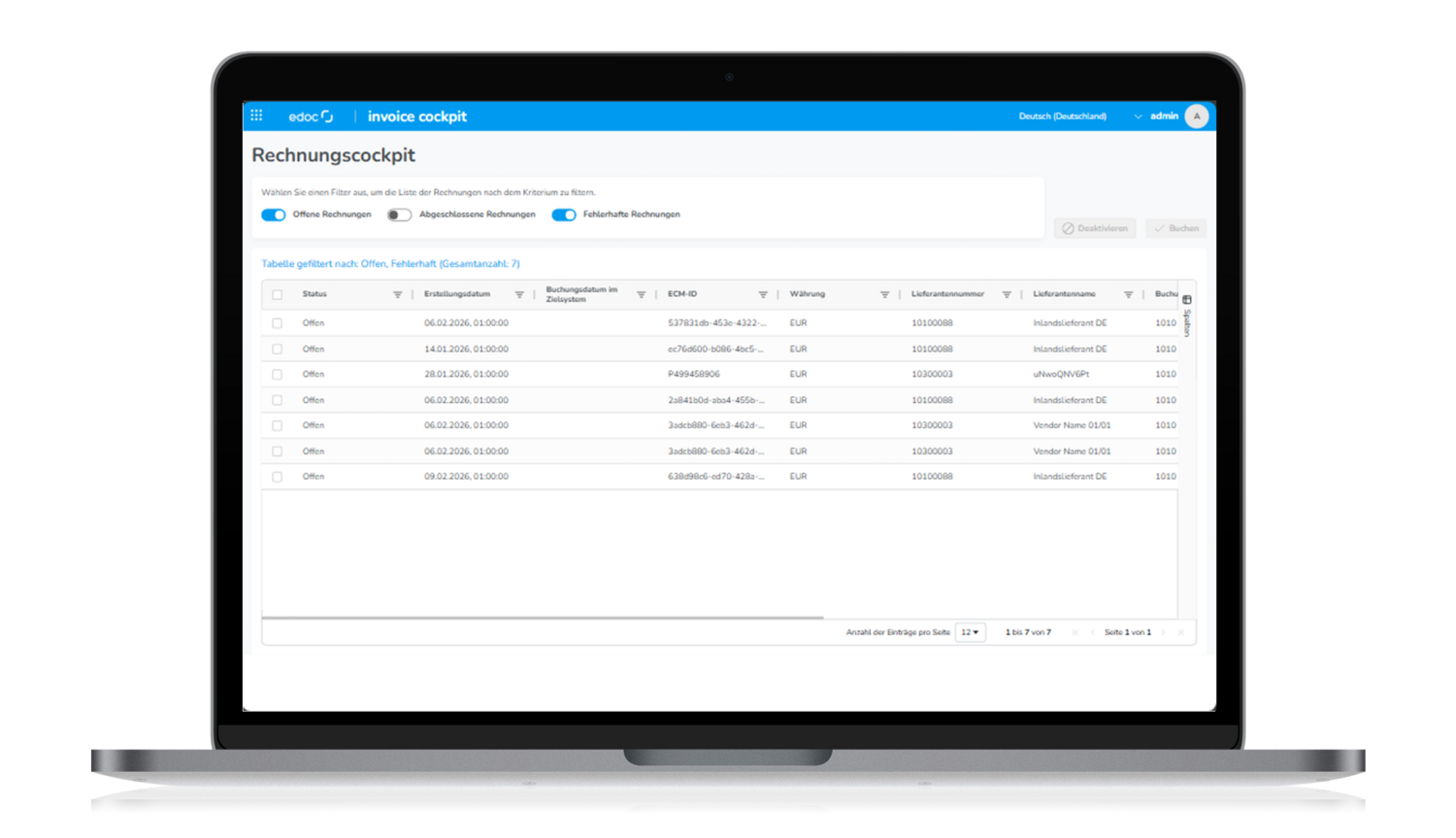
All completed invoice processes are brought together centrally in the edoc invoice cockpit. From there, accounting teams can process invoices collectively in SAP Cloud ERP – automatically, manually, or as a preliminary posting. Intelligent status indicators show which invoices are ready for posting and where further clarification is required. Any errors during the transfer to SAP are displayed transparently and can be selectively reprocessed.
Centralized posting, a clear overview, and full control – without switching systems.
Most important features
Automated invoice receipt
edoc invoice automatically captures incoming invoices and routes them directly into the processing workflow. Common channels such as email, file transfer, and electronic invoice formats are fully supported.
Paper invoices can also be easily digitized through a scanning connection and integrated into the workflow without any manual steps.
No invoices are lost, and the entire invoice receipt process is fully digital and traceable at all times.
Automated extraction and validation of invoice data
Once an invoice is received, the relevant invoice data is automatically extracted. This includes the vendor, document details, amounts, line items, and account assignment information.
The extracted data is compared with the information available in the ERP system and mapped to the fields required for SAP Cloud ERP using configurable mapping rules.
As a result, the accounting team receives structured and validated invoice data that provides a reliable basis for efficient posting.
Integrated error handling and logging
If an error occurs during the transfer or posting of an invoice, it is logged in a structured format within the edoc invoice cockpit. Accounting can immediately see which invoice is affected and why.
Faulty processes can be restarted in a targeted manner, while all steps remain fully documented and traceable.
This ensures consistent issue resolution and provides transparency and security in day-to-day operations.
From invoice processing to archiving
In addition to verifying invoices and transferring them to SAP Cloud ERP, audit-compliant archiving and long-term document access are essential.
While edoc invoice manages incoming invoice processing outside the SAP core and transfers invoice data to SAP in a structured way, the edoc CMIS archive suite for SAP Cloud ERP ensures that invoices and related documents are securely archived and remain accessible across systems, including all associated metadata and classifications.
The result is a seamless, end-to-end process—from invoice processing through archiving—that effectively complements SAP Cloud ERP and meets the needs of accounting, IT, and compliance alike.
Frequently asked questions
edoc invoice supports all common invoice formats that comply with GoBD requirements. This includes the widely used PDF format, TIF (G4), and the newer e-invoice formats such as XRechnung and ZUGFeRD. Invoices that still arrive in paper form can also be processed. For this, existing MFP scanners can be used — no special hardware is required.
The way invoice data is captured depends on the format in which it is received. For traditional PDF or TIF invoices, including scanned paper invoices, content is extracted using AI-powered OCR text recognition. For e-invoice formats, the included XML datasets are processed and interpreted. The system automatically selects the appropriate method — no manual interaction from users is required.
Under the German Growth Opportunities Act, paper invoices are still permitted for the time being and, under certain conditions, will remain so until 2028. In this case, digitization (scanning) of the paper invoice must be carried out by the recipient. Typically, existing MFP scanners are used to send scanned invoices via “scan-to-mail” directly to edoc invoice. From that point on, content extraction (OCR) and process initiation work exactly as they do for digitally received invoices. No separate processing workflows are required.
Yes, dedicated user manuals for edoc invoice are available in the edoc Docs Center and are always kept up to date. An administration manual is also available. Before performing your own administrative tasks, we recommend attending edoc’s administration training. This makes it easier to understand the required activities and ensures the manual can be used more effectively.
Yes, release notes are published in the edoc Docs Center for edoc invoice as well as for all other edoc software products whenever a new version is released. They can be accessed there at any time.
Do you use SAP Cloud ERP and are you looking for a solution for your incoming invoice processing?